A lookup that returns the wrong value with no error is worse than one that returns #N/A, because nobody checks it. Most XLOOKUP vs INDEX/MATCH comparisons name a winner; I care more about which one fails loudly and which one fails quietly. This tutorial runs the same six lookups through INDEX/MATCH, XLOOKUP and VLOOKUP in one workbook, shows where they agree and where they do not, and ends with when I use each.
The syntax, side by side
INDEX/MATCH is two functions: MATCH finds the row, INDEX returns the value from that row.

=INDEX(return_range, MATCH(lookup_value, lookup_range, 0))
XLOOKUP is one function, and its default is an exact match, so there is no 0 at the end.

=XLOOKUP(lookup_value, lookup_range, return_range)
XLOOKUP's optional arguments, in order, are if_not_found, match_mode and search_mode. The cases below use all three.
The test data
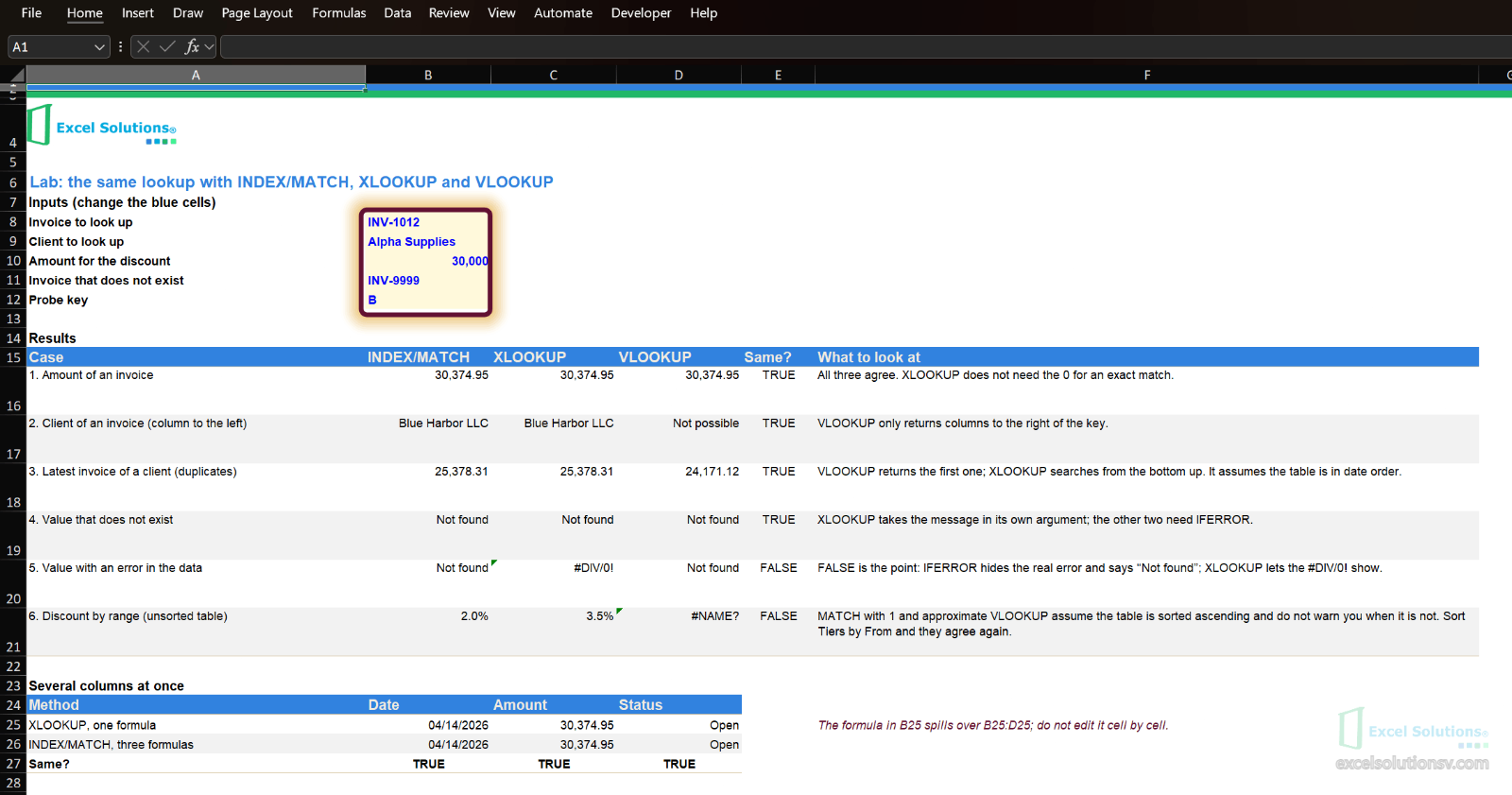
The workbook has an Invoices table of 24 rows and 6 clients. The Client column sits to the left of Invoice on purpose, because that is where VLOOKUP gets into trouble. Lab holds five blue input cells and six cases; each case has the three formulas side by side and a Same? column that says whether INDEX/MATCH and XLOOKUP gave the same result.
Case 1 and 2: exact match, and a column to the left
Type INV-1012 in B8. The amount is 30,374.95 in all three formulas and the client is Blue Harbor LLC in INDEX/MATCH and XLOOKUP:
=INDEX(tblInvoices[Amount], MATCH($B$8, tblInvoices[Invoice], 0))
=XLOOKUP($B$8, tblInvoices[Invoice], tblInvoices[Client])
VLOOKUP cannot return the client: it only returns columns to the right of the one it searches. The usual fixes are to move the Client column or to switch function.
Case 3: the latest of several matches
Alpha Supplies has five invoices. VLOOKUP returns the first one, 24,171.12. XLOOKUP with search_mode -1 searches from the bottom up and returns the last, 25,378.31:
=XLOOKUP($B$9, tblInvoices[Client], tblInvoices[Amount], , 0, -1)
INDEX/MATCH gets the same number, but you have to find the last row yourself with an array formula:
=INDEX(tblInvoices[Amount], MAX(IF(tblInvoices[Client]=$B$9, ROW(tblInvoices[Client])-MIN(ROW(tblInvoices[Client]))+1)))
In Excel 365 you press Enter; in older versions, CTRL + SHIFT + ENTER. Both assume the table is in date order: the last row is the latest invoice only if someone has not sorted it differently. If you need every invoice of the client, not one, use FILTER, as in Beyond Excel Formulas: Build an Effortless Quotation System.
Case 4 and 5: not found, and the error you do not see
For a value that does not exist, XLOOKUP takes the message as its fourth argument. The other two need IFERROR:
=XLOOKUP($B$11, tblInvoices[Invoice], tblInvoices[Amount], "Not found")
=IFERROR(INDEX(tblInvoices[Amount], MATCH($B$11, tblInvoices[Invoice], 0)), "Not found")
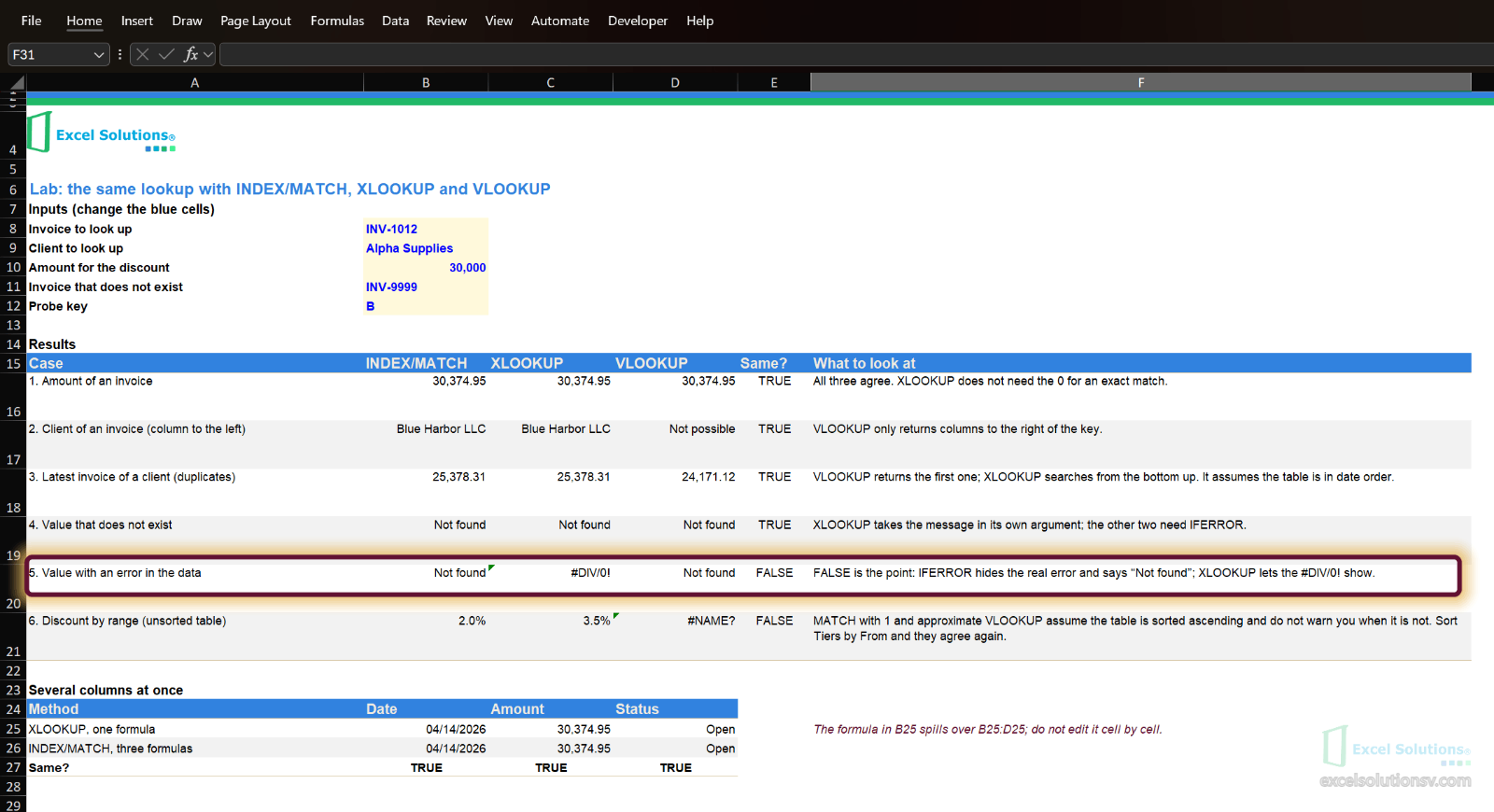
The difference matters in case 5. The Tiers sheet has a small probe table where the value for key B is a #DIV/0! on purpose. Type B in B12: XLOOKUP shows the #DIV/0!, because the key was found and the value is the error. INDEX/MATCH and VLOOKUP wrapped in IFERROR say Not found, which is false: the key exists and the data is broken. In the Same? column the result is FALSE, and that is the point.
IFERROR replaces every error, not just #N/A. If you keep INDEX/MATCH, wrap it in IFNA, which replaces only #N/A and lets a #DIV/0! through:
=IFNA(INDEX(tblProbe[Value], MATCH($B$12, tblProbe[Key], 0)), "Not found")
Case 6: a discount by range on an unsorted table
The Tiers table maps an amount to a discount: from 0, 0%; from 10,000, 2%; from 50,000, 5%. Someone added a fourth row at the end, from 25,000, 3.5%. The table is no longer sorted.
=XLOOKUP($B$10, tblTiers[From], tblTiers[Discount], , -1)
=INDEX(tblTiers[Discount], MATCH($B$10, tblTiers[From], 1))
=VLOOKUP($B$10, tblTiers, 2, TRUE)
With 30,000 in B10, XLOOKUP returns 3.5%: match_mode -1 means the exact value or the next smaller one, and it does not need the table sorted. MATCH with 1 and VLOOKUP with TRUE assume the table is sorted from smallest to largest and give no warning when it is not, so they can return the wrong tier with no error. Type 60,000: XLOOKUP gives 5%. Then sort Tiers by From and the three agree again.
Several columns at once
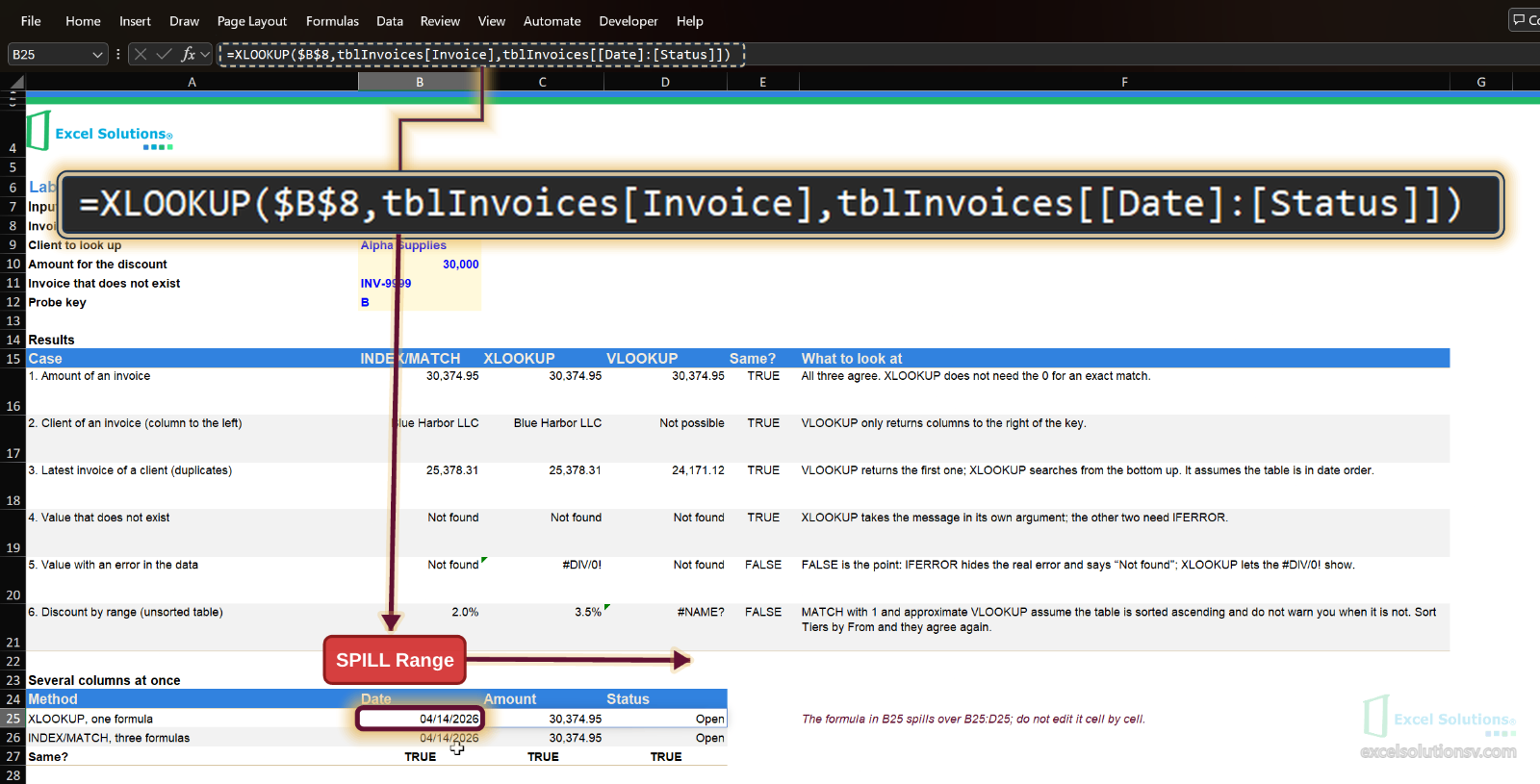
If you need the date, the amount and the status of an invoice, XLOOKUP can return the three with one formula, because its return_range can be several columns wide. The result spills across three cells:
=XLOOKUP($B$8, tblInvoices[Invoice], tblInvoices[[Date]:[Status]])
INDEX/MATCH needs one formula per column, or a MATCH in a helper cell. Both give the same three values for INV-1012.
When I use each one
| Situation | I use | Why |
|---|---|---|
| Everyone who opens the file has Microsoft 365, Excel 2021 or later | XLOOKUP | Fewer arguments, exact match by default, a built-in message for not found |
| The file goes to a client or colleague who may have Excel 2019 or earlier | INDEX/MATCH | XLOOKUP shows #NAME? in those versions |
| The value to return is to the left of the key | XLOOKUP or INDEX/MATCH | VLOOKUP cannot |
| Latest of several matches | XLOOKUP with search_mode -1 | One argument instead of an array formula |
| An existing VLOOKUP that works | Leave it | Rewriting it gains nothing, but check that nobody inserts a column inside the range: the column number would then point to the wrong column |
Limits
- XLOOKUP is not in Excel 2019 or earlier. It works in Microsoft 365, Excel 2021 and 2024 and Excel for the web. In older versions the cell shows #NAME?; check Microsoft's own XLOOKUP page before you send a file out.
- I did not measure speed. Whether one is faster depends on the size of the file and the Excel version, so test it on your own workbook before you rewrite anything for performance.
- The last-match case relies on the order of the table. If invoices are not in date order, the last row is not the latest.
- The data is fictitious and small. It shows how each formula behaves, not how fast, and not how your own data looks; test on your own file before you replace formulas in a workbook you use.
Workbook
Download the lookup lab workbook, with fictitious data, no sign-up and no email. It has the six cases, the several-columns block and eight guided tests with the expected result. In Excel 2019 or earlier the XLOOKUP cells will show #NAME? and the rest will work.
If you want a lookup model checked for your own workbook, let's talk.